How to upgrade to v2
With the v2 update of our effects plug-ins, we’re switching to a new licensing model that allows you to use your plug-ins on all of your devices, both mobile and desktop. We’re also changing the way we distribute our software to make it easier to deliver the various plug-in formats we support.
Here’s what’s changing.
- iOS: Our v2 plug-ins have brand new App Store listings. The v2 plug-ins are currently iPad-only. We plan to re-add portrait mode & iPhone support as soon as we can!
- macOS: Our v2 plug-ins are no longer distributed through the App Store, now we distribute installers directly from this site.
- The v1 App Store listings will now display (Legacy) in their name and receive only maintenance updates.
If you bought one of our legacy effects plug-ins on the App Store you may be eligible for a free upgrade to a v2 license.
As of April 29, the iOS versions of our v2 plug-ins are still waiting for final approval from Apple. You won’t be able to activate your v2 plug-in on iOS yet, but you can still create your Sketch Audio account and redeem your code.
Here’s how to upgrade your license.
- Go to the App Store and make sure you have the latest version of each v1 plug-in installed (1.6 or newer).
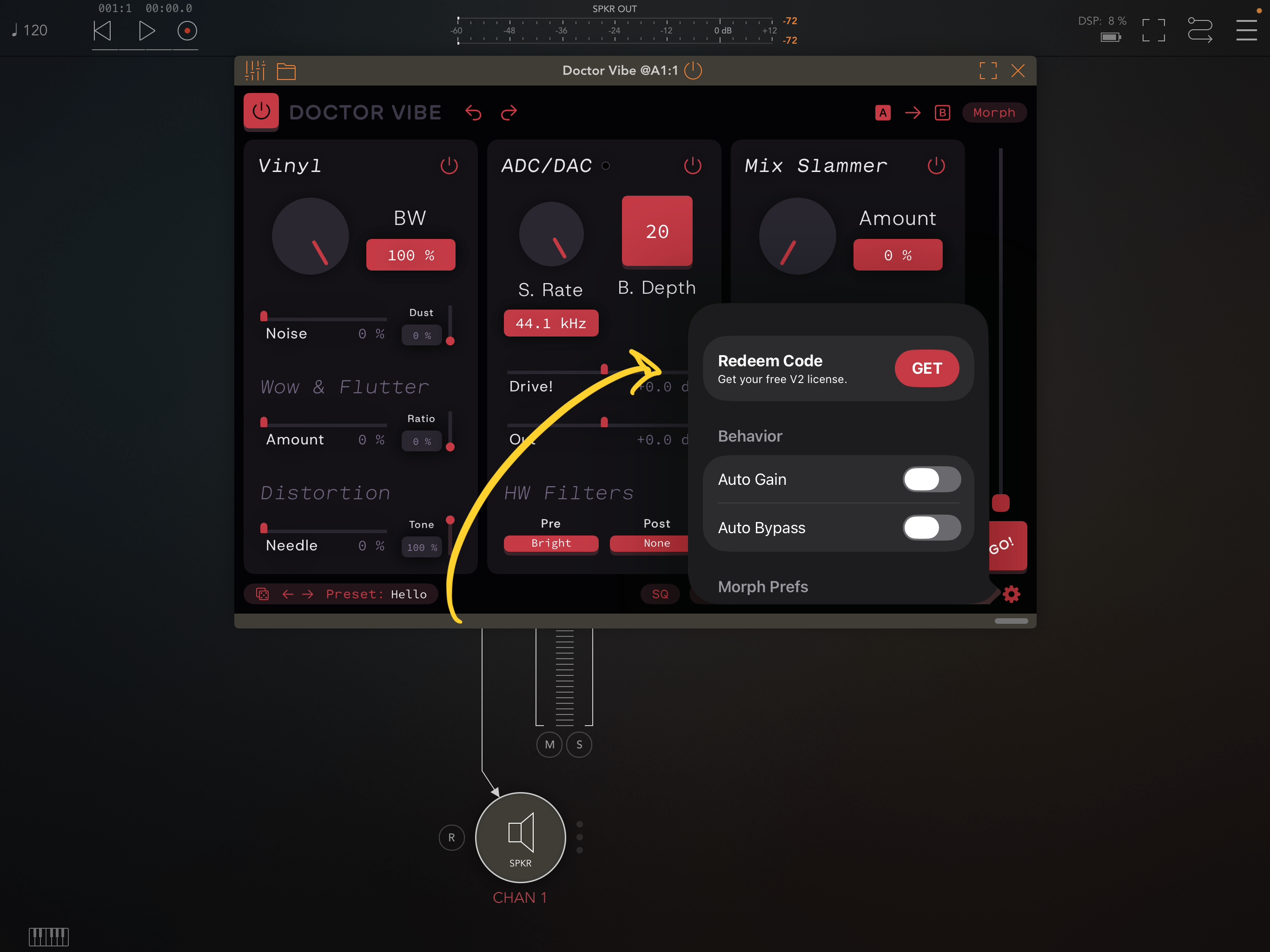
- Open the plug-in in your preferred host and go to the plug-in settings (tap gear icon).
- If you’re eligible for an upgrade, you’ll see an item Redeem Code.
- Tap GET and after a few seconds a code should appear. Copy the code.
- Go to https://sketchaudio.com and create an account (click Log in).
- Go to Redeem, paste your code, and finally hit Redeem voucher.
- You should see the product added to your account.
- Download the new, v2 plug-in from the our website or the App Store.
- You can unlock the product from the standalone app or the plug-in. If you use the app, choose I already own this.
Am I eligible for an upgrade?
If you bought any of our effects plug-ins before the v2 update, you will receive a free upgrade. Purchases of our legacy effects made in v1.6 or later are not eligible for free upgrades.
I think I’m eligible for the upgrade but I don’t see the GET button.
Send us an email and we’ll get it sorted out.
What if I don’t want to upgrade?
That is totally fine. You can keep using your v1 plug-ins as long as you want. You can always upgrade later. Just be aware that our development effort is now focused on our v2 products.