What happens when I turn on High Quality mode in a Sketch Audio plug-in? Read on to find out!
Our plug-ins have two quality modes: standard (SQ), and high (HQ).
SQ mode uses the session sample rate. HQ mode oversamples the plug-in by the factors shown below.
| Session Sample Rate (kHz) | Oversample Factor |
| 0 < SR ≤ 48 | 4x |
| 48 < SR ≤ 96 | 2x |
| 96 < SR ≤ 192 | 1x (no oversampling) |
| 192 < SR ≤ ∞ | Not supported |
What is oversampling?
Oversampling is a process that allows you to run the plug-in’s internal processing at a higher sample rate than the session.
Here are some benefits of oversampling:
- Reduction in aliasing distortion.
- Decramping of low-pass and bell filters.
Here are some costs of oversampling:
- Increased CPU usage (2 to 4x).
- Some latency (~1 ms in our plug-ins).
- Peak levels exiting the plug-in will be altered slightly by the oversampling filters.
Oversampling works by
1) running the audio through a special filter which adds intermediate samples,
2) doing the plug-in processing at the new, higher sample rate, and
3) running the audio through another filter,
4) discarding the now unused intermediate samples.
The filters we use have a very high cutoff frequency (above 20 kHz), which make the process very transparent. Unless otherwise noted, our plug-ins use linear phase oversampling filters.
What is aliasing?
Aliasing is a type of distortion that can happen in the digital domain when you add harmonics to a signal; i.e., use saturation. There are many great videos and resources on the internet explaining what aliasing is and why it happens, so we’ll try to keep it brief here.
Aliasing arises from a fundamental rule in digital audio: The highest frequency that can be correctly reproduced at the output of a DAC is one half of the sample rate. This frequency is called the Nyquist frequency (or, just Nyquist).
* You can think of it as the speed of light but for digital audio, nothing above it is allowed!
For audio entering your computer, everything is OK because there are filters in your interface that remove all the frequencies higher than Nyquist. However, if a plug-in later adds harmonics, some of them may end up above that critical frequency. What ends up happening then is that these frequencies appear instead as aliases below Nyquist.
Typically these aliases are undesirable because they have no meaningful relationship to the original signal. (Analog gear, of course, has no “sample rate” and therefore no Nyquist frequency and no aliasing.)
* In many cases, aliasing is very quiet and may not even be noticeable. However, if you’re using our plug-ins with “unusual” signals or at extreme settings, the aliasing may become a problem. For these situations, our HQ mode is typically able to reduce aliasing by >60 dB.
Show me an example.
Here’s Hyper Boost with some fairly extreme settings applied to a 3.5 kHz sine wave.
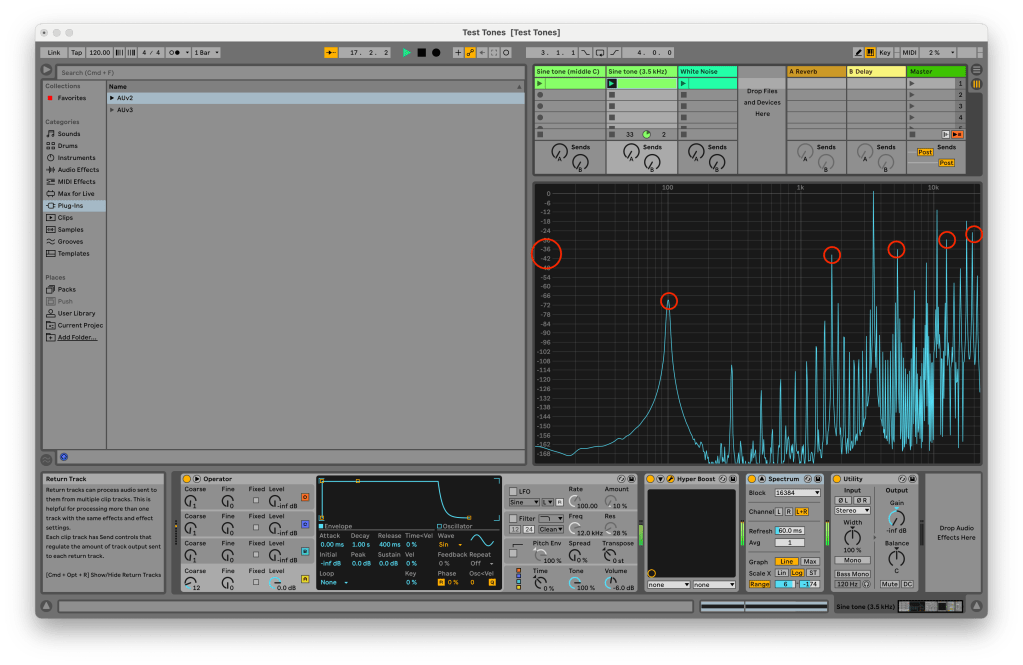
This is standard quality mode, with a session sample rate of 44.1 kHz. You can see the aliases highlighted in red, and they get as high as -36 dB in the part of the spectrum humans are most sensitive to (2–5 kHz).
Even at this level, they may be difficult to hear in a mix (though, trust your own ears!), but if we later want to compress this signal, we could run into issues.
Here is the same signal and settings with HQ mode enabled.

You can see that the aliases have been moved to below -100 dB! This is below the 16-bit noise floor. Very nice!
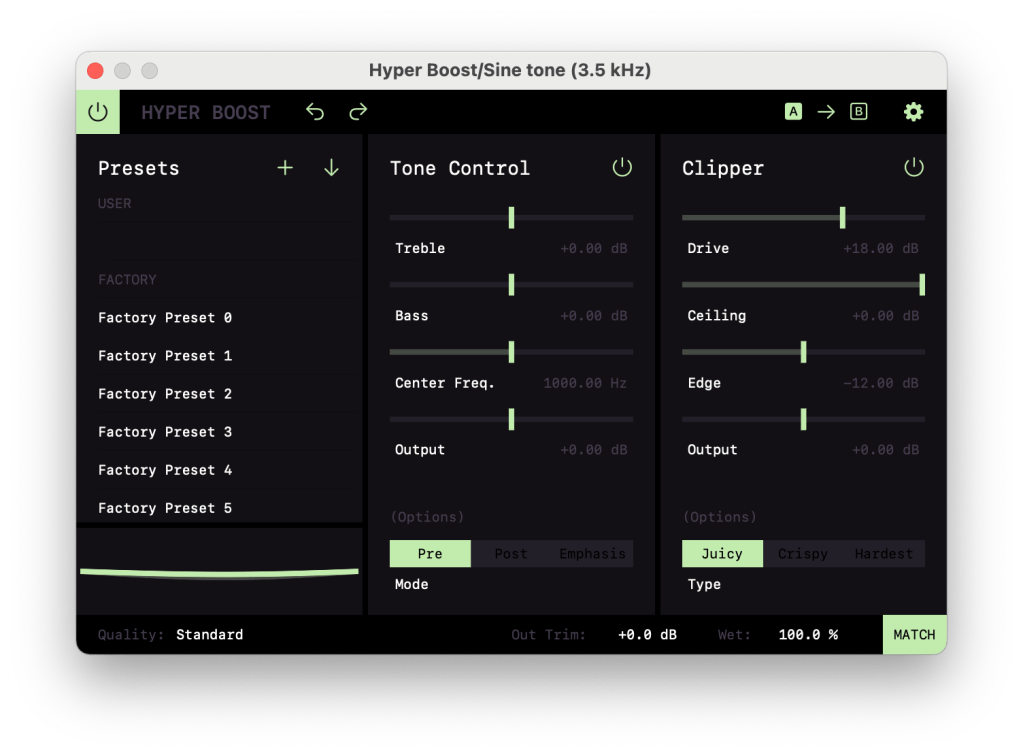
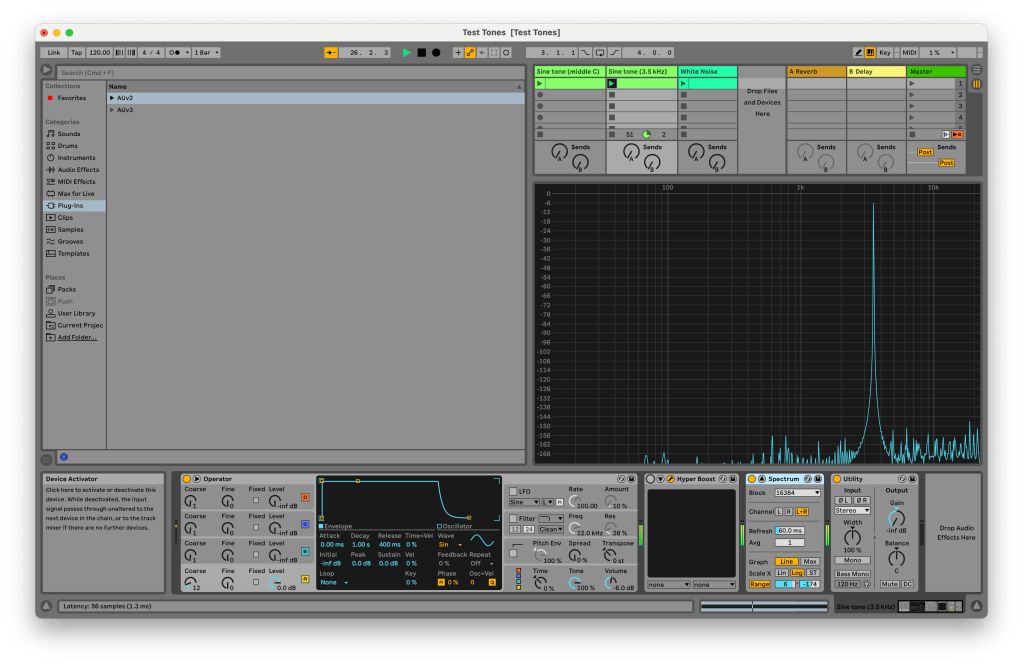
For reference here are the Hyper Boost settings as well as the clean signal. This test should be easy to set up in your own DAW!
What other techniques do you use?
In Hyper Boost, to further reduce aliasing, we use antiderivative antialiasing (ADAA). ADAA is a relatively new technique that allows you to mitigate aliasing without additional oversampling.
* For the math nerds out there, basically instead of doing all your calculations directly, you calculate the antiderivative of whatever math function (fancy calculus) and then later differentiate the signal (more fancy calculus).
Because there is some high-frequency roll off associated with the technique, ADAA is only used when the plug-in’s internal sample rate is at or above 88.2 kHz. This means that ADAA is automatically used in HQ mode and will also be used in SQ mode when the session sample rate is at or above 88.2 kHz.
Stay tuned for a follow on post about filter cramping!
 Sketch Audio